The Best Free AI Photo Editing Tool in 2025 – Edit Background, Clothes & More!
Hey guys! How are you all doing?
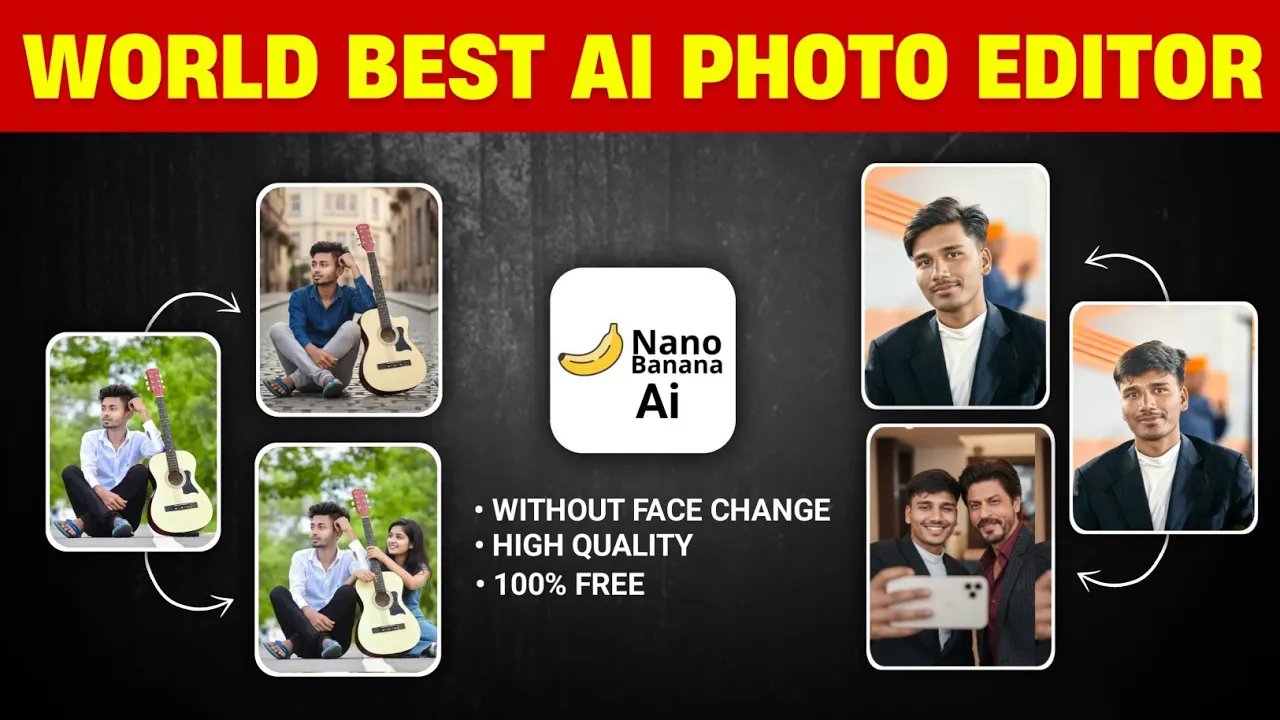
Today, I’m super excited to introduce you to what I believe is the world’s best AI photo editing tool—and guess what? You can use it absolutely free online. This AI lets you do just about anything with your photos: change backgrounds, outfits, hairstyles, or even add/remove people from the image!
Stick around till the end of this post to learn which AI tool I’m talking about, how to use it, and why it’s a total game-changer. Let’s dive in!
What You Can Do With This AI Tool
- Change the background of any image
- Swap clothes or add traditional outfits like sarees
- Modify hairstyles
- Add or remove people or objects
- Merge photos to create realistic selfies (e.g., with celebrities!)
All of this can be done in just a few clicks. No Photoshop needed. No advanced skills required.
Step-by-Step Guide: How to Use the AI Photo Editor
1. Open Chrome and Search for “LM Arena”
Start by opening Google Chrome or any browser and simply search for:
LM ArenaClick on the official link. This will take you to the platform that hosts the AI tool.
Direct Link: https://lm-arena.com/
2. Switch to “Direct Chat” Mode
Once inside LM Arena:
- Click the bottle-like icon on the interface
- Select Direct Chat
This will unlock the powerful Gemini Flash Image Editor – a new AI tool that usually requires a subscription, but here, it’s free to use!
3. Upload Your Image
- Click the “+” button to upload a photo from your gallery
- Choose the image you want to edit
Once uploaded, you’ll see the image on the screen, ready for customization.
How to Give Commands for Editing
Just type what you want in simple English. Here are some examples:
To Change Background:
Change the background into a cinematic nature view with DSLR-style bokeh effect.To Change Clothes:
Change the clothes into a saree.To Add Someone Like a Celebrity:
Upload your photo and a photo of the person (e.g., Shah Rukh Khan), then type:
Mix my and Shah Rukh Khan’s photo and create a realistic selfie as if I’m taking a photo with him.To Expand Image and Add People:
Expand the image and add his girlfriend beside him sitting on the bench.That’s it! Just click “Send” and let the AI work its magic. Your new image will be ready in about 10 seconds.
How to Download Your Edited Photo
Once you’re happy with the result:
- Click the “Download” button
- The image will be saved directly to your device
No watermark, no quality loss. Super convenient!
Real-World Use Cases
This tool is not just for fun selfies. You can use it for:
- Product mockups (e.g., adding a mic or clothing to a model)
- Professional portfolio edits
- Social media content creation
- Fashion edits and try-on previews
Recommended Resources
- Canva Photo Editor (Free)
- Runway ML – Advanced AI Editing
- Remove.bg – Instant Background Removal
- Unsplash – Free High-Quality Background Images
Why This Tool Stands Out
Unlike other tools (even ChatGPT or Photoshop), this AI maintains your exact facial features, making the edits look extremely natural. Whether you’re adding someone to the image or changing clothes, the realism is unmatched.
Final Thoughts
If you’ve read this far, chances are you’re as amazed as I was when I discovered this tool. It’s:
- Free to use
- Super beginner-friendly
- Fast & efficient
- Incredibly realistic
So what are you waiting for? Go try it now and let me know in the comments how it worked for you!
Share Your Feedback!
If you liked this tool and found the tutorial helpful, please:
- Leave a comment below with your experience
- Hit the like button if you’re reading this on a blog with reactions
- Share this post with your friends who love editing photos
💡 “We also work hard to bring you these tips—so your appreciation means a lot!”
💬 Join our WhatsApp Channel for updates!
👉 Click here to join