Create Trending 3D AI Photos for Instagram Using Google Gemini
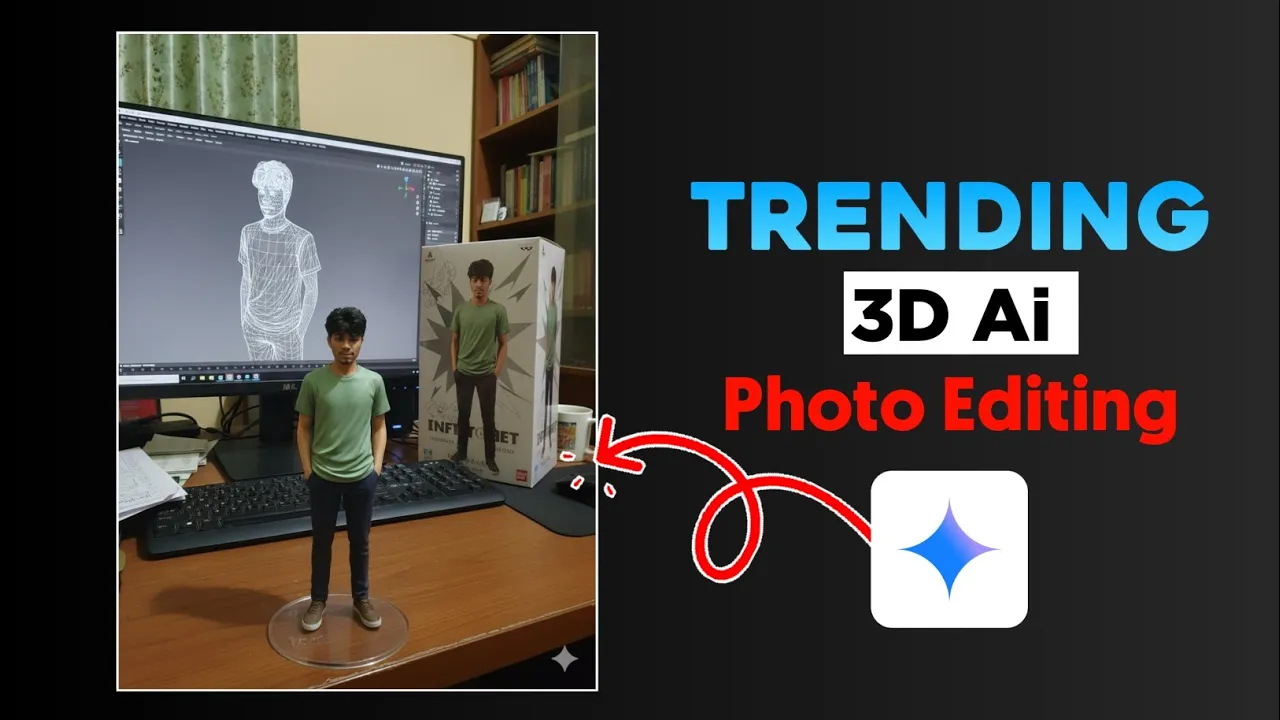
Hey guys, how are you all doing? In today’s tutorial, I’ll show you how you can create viral 3D AI photos that are trending on Instagram right now. The best part is that you don’t need any advanced editing skills – just a simple text prompt and Google Gemini will do the magic for you.
If you’ve ever wanted to turn your normal photos into realistic 3D-style AI edits, make sure you read this article till the end because I’ll walk you through the exact step-by-step process.
Step 1: Install Google Gemini App
To get started, you need the Google Gemini app. If you don’t already have it, just open the Google Play Store, search for Google Gemini, and install it. I’ve already installed it, so I’ll just open it directly.
Step 2: Sign in With Your Gmail
If this is your first time using Gemini, sign in with your Gmail account. Once signed in, you’ll have full access to the AI tools, including the Image Creation Mode.
Step 3: Upload Your Photo
Now click on the Image Mode. You’ll see a plus (+) icon near the gallery option – click it to upload a photo from your phone. Make sure your photo is clear, especially the face area, because Gemini will use it to create the 3D effect.
Step 4: Add Your Prompt
Once your photo is uploaded, you need to paste the AI prompt. Don’t worry, I’ve provided a sample prompt below, but you can also customize it:
“Create a 3D AI-styled Instagram photo with realistic details and cinematic lighting.”
Copy the prompt and paste it into the “Describe your image” box. Then simply hit Send. Within 30 seconds, Gemini will generate your brand new 3D AI photo.
Step 5: Download Your AI Photo
Once generated, click the Download option to save your photo. You’ll notice that the photo looks slightly blurry in Gemini’s preview, but once downloaded to your gallery, the quality automatically improves.
Step 6: Add a Name or Text on the Box
If you want to add a custom name or label on your photo (like a production tag or brand name), you can use a second prompt. For example:
“Create a 3D AI photo with cinematic effects and add the text ‘My Brand’ on the box.”
Just replace My Brand with your name or logo text. Paste the prompt and hit send again. Gemini will generate a new version with your chosen text embedded into the design.
Step 7: Generate Multiple Versions
If you’re not satisfied with the first version, simply type Another in the prompt and Gemini will create a new variation. You can keep doing this until you get the perfect photo that matches your style.
Why 3D AI Photos are Trending on Instagram
Instagram users love unique, creative, and futuristic content. 3D AI photos stand out because they look professional, cinematic, and surreal – all without spending hours editing. With AI tools like Google Gemini, anyone can create stunning visuals in seconds.
If you want more AI-powered editing tools, check out:
Final Thoughts
And that’s it, guys! With just one app and a simple text prompt, you can transform your normal photo into a trending 3D AI masterpiece. Use these edits to boost your Instagram reels, profile pictures, or even create digital content for personal branding.
If you found this guide helpful, don’t forget to leave a like, and if you’re new here, make sure to subscribe for more AI editing tips. 🚀
Prompt 1
“Create a 1/7 scale commercialized figurine of the characters in the picture, in a realistic style, in a real environment. The figurine is placed on a computer desk. The figurine has a round transparent acrylic base, with no text on the base. The content on the computer screen is a 3D modeling process of this figurine. Next to the computer screen is a toy packaging box, designed in a style reminiscent of high-quality collectible figures, printed with original artwork. The packaging features two-dimensional flat illustrations.
Promt 2
“Use the uploaded photo as reference. Keep the clothes exactly the same as in the original photo, without any color or style change. Generate a full HD, ultra-realistic image where the figurine stands prominently on a modern computer desk, displayed slightly larger in the foreground. Behind the figurine, a large monitor shows a detailed 3D wireframe model of the same person in the same pose. Next to the monitor, include a product box with an illustrated version of the p
💬 Join our WhatsApp Channel for updates!
👉 Click here to join